
OpenVPN Access Server Hosting on MassiveGRID PaaS
OpenVPN Access Server deploys a private VPN server inside your own MassiveGRID PaaS environment, with a web-based admin console and a client portal that hands users pre-configured OpenVPN profiles. Use it for secure remote access to your environments, a fixed egress IP or an encrypted tunnel for your team.
OpenVPN Access Server on MassiveGRID PaaS installs in one click in New York, London, Frankfurt or Singapore, costs about $19.68 a month for the Starter configuration, an OpenVPN Access Server node (1 GiB), and starts with a 14-day free trial. See the sizing table.
Both buttons open the MassiveGRID PaaS dashboard with OpenVPN Access Server pre-selected. Sign up without a card, name the environment, pick a region, and the package installs in a few minutes.
OpenVPN Access Server Package Facts
| Attribute | Value |
|---|---|
| Package | OpenVPN Access Server |
| Type | Application (installs a complete environment) |
| Category | DevOps & Admin Tools |
| Software vendor / project | OpenVPN Inc. |
| Licence | Proprietary (free for two concurrent connections; paid licences for more) |
| Runtime / stack | OpenVPN Access Server on a dedicated Linux node with public IP |
| Regions | New York, London, Frankfurt, Singapore |
| Billing | Pay-per-use, about $19.68/month for the Starter configuration (8 cloudlets at $0.003372 per cloudlet-hour), no licence fee |
| Free trial | 14 days, no credit card |
| Uptime SLA | 100% |
What is OpenVPN Access Server?
OpenVPN Access Server is the commercial packaging of the OpenVPN protocol: the same battle-tested VPN with an admin web UI, user management, LDAP and RADIUS integration, access-control rules and a self-service portal where users download clients and profiles. It is widely used to give staff and contractors secure access to private networks and to protect traffic from untrusted networks.
The package deploys the server on a dedicated Linux node with a public IP in the MassiveGRID region you choose, initialises the admin account and exposes the admin and client portals over HTTPS. From there you create users, set routes to your other environments' private networks, and distribute profiles. Two concurrent connections are free under OpenVPN Inc.'s licence; more require a licence key from them.
What the OpenVPN Access Server Package Deploys
Marketplace packages are not bare container images. One click provisions a complete, production-shaped environment on MassiveGRID infrastructure. How these nodes are sized and what they cost.
- OpenVPN Access Server node: A dedicated Linux container with the Access Server installed and the OpenVPN daemon running.
- Public IP: A dedicated public address for VPN clients to connect to, in the region you select.
- Admin and client web portals: HTTPS admin console for configuration and a client portal for profile downloads.
- Initial administrator: Admin credentials delivered after installation.
What OpenVPN Access Server Costs to Run
Three starting configurations for the OpenVPN Access Server package, sized in cloudlets (1 cloudlet = 128 MiB RAM + 400 MHz CPU) and priced at the published rate of $0.003372 per cloudlet-hour, or $2.46 per cloudlet-month.
| Configuration | Topology | Cloudlets | Est. per month |
|---|---|---|---|
| StarterA handful of users | OpenVPN Access Server node (8 cloudlets, 1 GiB) | 8 | $19.68 |
| StandardA company of remote staff | OpenVPN Access Server node (16 cloudlets, 2 GiB) | 16 | $39.36 |
| ProductionHundreds of concurrent tunnels | OpenVPN Access Server node (32 cloudlets, 4 GiB) | 32 | $78.72 |
Estimates assume the environment averages the listed cloudlets around the clock; billing is hourly, vertical auto-scaling lowers the figure when the application is idle, and volume discounts apply as usage grows. Disk and external traffic are billed per gigabyte on top. No licence fee applies to the package. Pick a row in the installer by setting the cloudlet limits per node, or start small and let auto-scaling grow it. Price a different topology or a working-hours schedule in the PaaS pricing calculator; the PaaS page describes the billing model.
Why Teams Choose OpenVPN Access Server
Secure remote access
Reach databases, admin panels and internal services in your PaaS environments without exposing them publicly.
Fixed egress IP
Route team traffic through one known IP for allow-listing on third-party services.
Enterprise authentication
Local users, LDAP, RADIUS, SAML and two-factor authentication options.
Regional exit points
Deploy servers in New York, London, Frankfurt or Singapore for geographic presence or compliance.
How to Install OpenVPN Access Server on MassiveGRID PaaS
Installing the package takes three steps and a few minutes of waiting. No servers to provision, no configuration files to edit.
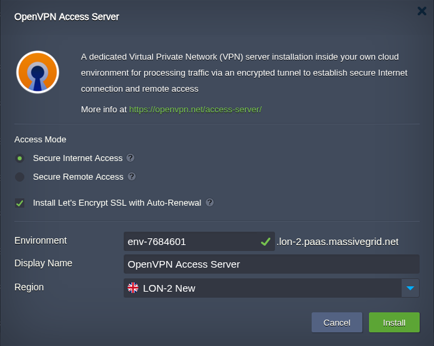
Open the installer
Click Install with free trial or Install to my account. The MassiveGRID PaaS dashboard opens with the OpenVPN Access Server package pre-selected, so nothing has to be copied or pasted.
Sign up or sign in
New to the platform? Sign up for the free 14-day trial, which needs no credit card. Existing customers sign in with their usual dashboard credentials.
Choose region and deploy
Name the environment, pick New York, London, Frankfurt or Singapore, and confirm. The platform builds every OpenVPN Access Server node, wires them together and hands you the live URL and credentials.
Who Runs OpenVPN Access Server on PaaS
Remote and hybrid teams
Employees and contractors accessing private infrastructure securely from anywhere.
Securing admin access
Restricting Jenkins, databases and dashboards to VPN users only.
Site-to-cloud connectivity
Linking an office network to environments on MassiveGRID PaaS.
Why Run OpenVPN Access Server on MassiveGRID PaaS
Built for uptime. OpenVPN Access Server runs on MassiveGRID's high-availability platform, where every environment is covered by a 100% uptime SLA. Nodes live on redundant hosts, storage is replicated, and failed containers are restarted or migrated automatically.
Pay for what you use. Billing is hourly and per cloudlet (128 MiB RAM plus 400 MHz CPU). Vertical auto-scaling adds and removes cloudlets as load changes, so a quiet OpenVPN Access Server environment costs a few dollars a month and a busy one grows without a migration. Full details are on the PaaS page.
Your choice of jurisdiction. Deploy in New York, London, Frankfurt or Singapore and keep data inside the region your users or regulators require. MassiveGRID is ISO 27001 and ISO 9001 certified and GDPR compliant, and has run hosting infrastructure since 2003.
No lock-in. The package is a standard Jelastic Packaging Standard (JPS) manifest. You keep root-level access to the containers, can export the manifest, and can move the workload to any other Jelastic-compatible platform or to your own servers at any time.
Related on massivegrid.com: Security Overview.
OpenVPN Access Server Questions
OpenVPN Access Server Guides from the MassiveGRID Blog
Scenario-driven guides on running OpenVPN Access Server on MassiveGRID PaaS, written for the developers, operators and buyers who deploy it. Browse the blog.
More from the Marketplace
Packages that are often deployed alongside OpenVPN Access Server, or that solve the same problem a different way. Browse all 83 packages.


Deploy OpenVPN Access Server Today
Start the free 14-day trial and have OpenVPN Access Server running in minutes. No credit card required.