
Kubernetes Cluster Hosting on MassiveGRID PaaS
The Kubernetes Cluster package deploys a certified, production-ready Kubernetes cluster on MassiveGRID PaaS in one click: control plane, worker nodes with horizontal auto-scaling, an ingress controller, the Kubernetes dashboard, Prometheus and Grafana monitoring and persistent storage. You pay per use for the nodes, with no cluster management fee.
Kubernetes Cluster on MassiveGRID PaaS installs in one click in New York, London, Frankfurt or Singapore, costs about $78.72 a month for the Starter configuration, a Control plane (2 GiB) and a Worker node (2 GiB), and starts with a 14-day free trial. See the sizing table.
Both buttons open the MassiveGRID PaaS dashboard with Kubernetes Cluster pre-selected. Sign up without a card, name the environment, pick a region, and the package installs in a few minutes.
Kubernetes Cluster Package Facts
| Attribute | Value |
|---|---|
| Package | Kubernetes Cluster |
| Type | Application (installs a complete environment) |
| Category | Clusters & Containers |
| Software vendor / project | Cloud Native Computing Foundation |
| Licence | Apache License 2.0 (open source) |
| Runtime / stack | Kubernetes control plane and worker nodes, ingress controller, dashboard, monitoring, persistent storage |
| Regions | New York, London, Frankfurt, Singapore |
| Billing | Pay-per-use, about $78.72/month for the Starter configuration (32 cloudlets at $0.003372 per cloudlet-hour), no licence fee |
| Free trial | 14 days, no credit card |
| Uptime SLA | 100% |
What is Kubernetes Cluster?
Kubernetes is the standard for running containerised microservices, but building a cluster involves choosing and wiring a container runtime, networking, ingress, storage, monitoring and upgrades. Managed Kubernetes services simplify that but usually add a control-plane fee and lock you into one cloud's networking and storage. This package gives you a complete cluster on MassiveGRID infrastructure with every component preinstalled and pay-per-use billing down to the cloudlet.
Worker nodes scale horizontally on load, so the cluster grows during busy periods and shrinks afterwards. You get kubectl access, the web dashboard and Helm, and can deploy any workload: microservices, CI runners, data pipelines or the Open Liberty Java stack from the marketplace. MassiveGRID also offers a high-availability Kubernetes hosting service with managed operations.
What the Kubernetes Cluster Package Deploys
Marketplace packages are not bare container images. One click provisions a complete, production-shaped environment on MassiveGRID infrastructure. How these nodes are sized and what they cost.
- Control plane: Kubernetes master node(s) running the API server, scheduler, controller manager and etcd, with an option for a multi-master high-availability control plane.
- Worker nodes: Auto-scaling workers running your pods, added and removed on CPU and memory triggers.
- Ingress controller: NGINX, Traefik or HAProxy ingress for routing external traffic to services, with SSL termination.
- Dashboard, monitoring and Helm: Kubernetes Dashboard, Prometheus and Grafana for metrics, and Helm for package management, all preinstalled.
- Persistent storage: A dynamic NFS-backed storage class so stateful workloads get persistent volumes without extra setup.
What Kubernetes Cluster Costs to Run
Three starting configurations for the Kubernetes Cluster package, sized in cloudlets (1 cloudlet = 128 MiB RAM + 400 MHz CPU) and priced at the published rate of $0.003372 per cloudlet-hour, or $2.46 per cloudlet-month. The control plane needs about 2 GiB on its own; worker capacity is what your pods actually get.
| Configuration | Topology | Cloudlets | Est. per month |
|---|---|---|---|
| StarterDevelopment and small services | Control plane (16 cloudlets, 2 GiB), Worker node (16 cloudlets, 2 GiB) | 32 | $78.72 |
| StandardProduction workloads | Control plane (16 cloudlets, 2 GiB), 2 × Worker node (32 cloudlets, 4 GiB each) | 80 | $196.80 |
| ProductionHA control plane and larger pools | 3 × Control plane (16 cloudlets, 2 GiB each), 3 × Worker node (48 cloudlets, 6 GiB each) | 192 | $472.32 |
Estimates assume the environment averages the listed cloudlets around the clock; billing is hourly, vertical auto-scaling lowers the figure when the application is idle, and volume discounts apply as usage grows. Disk and external traffic are billed per gigabyte on top. No licence fee applies to the package. Pick a row in the installer by setting the cloudlet limits per node, or start small and let auto-scaling grow it. Price a different topology or a working-hours schedule in the PaaS pricing calculator; the PaaS page describes the billing model.
Kubernetes Cluster on MassiveGRID PaaS vs Amazon EKS (as a managed Kubernetes example) vs a VPS
The same application three ways: the marketplace package here, the vendor's own hosted offer, and a server you run yourself. Amazon EKS (as a managed Kubernetes example) figures were read from the vendor's page on 1 November 2026; re-check them before relying on them.
| Aspect | Kubernetes Cluster on MassiveGRID PaaS | Amazon EKS (as a managed Kubernetes example) | A plain VPS |
|---|---|---|---|
| Monthly cost | About $78.72 (Starter) to $472.32 (Production), before discounts; no cluster fee | $0.10 per cluster per hour (about $73 a month) for standard support, $0.60 with extended support, plus the EC2 worker nodes and load balancers billed separately | Several servers you install kubeadm on; plus the engineering to run etcd and upgrades |
| What you manage | The application inside the containers (updates, configuration); the platform runs the infrastructure, scaling and the 100% uptime SLA | AWS runs the control plane; you run the workers and the workloads | Everything: OS, runtime, database, TLS, backups, upgrades |
| Limits and metering | No cluster fee; capacity is the nodes' cloudlets | Per-cluster fee regardless of size; node and add-on charges per AWS price list | No metering; limited by the server's size |
| Scaling | Vertical by the cloudlet, automatic and without restart; horizontal on a trigger behind the platform's load balancer | Node groups and autoscalers you configure; billed per EC2 instance | Resize the server, usually with a reboot; no horizontal scaling without your own load balancer |
| Data location | New York, London, Frankfurt or Singapore, chosen at install; data stays there | AWS regions | Wherever the VPS is; one server, one location |
| Backups | Database Backup/Restore and Backup Storage add-ons on a schedule, environment clone for rehearsals | Your responsibility (Velero or similar); etcd managed by AWS | Your own cron jobs and off-server copies |
| Availability | 100% uptime SLA, nodes on separate hosts, failed containers restarted or migrated | AWS EKS SLA for the control plane | Single server; the provider's hardware SLA only |
| Lock-in | Standard JPS manifest and root access; export the manifest or move the containers at any time | Kubernetes is portable; AWS load balancers, IAM and storage classes are not | None; you own the server |
Where Amazon EKS (as a managed Kubernetes example) is the better choice: EKS is the right answer for a team already inside AWS whose workloads depend on its load balancers, IAM and managed services; the per-cluster fee is small beside a large production node pool.
Why Teams Choose Kubernetes Cluster
Certified Kubernetes
Upstream, CNCF-conformant Kubernetes with regular version updates available from the dashboard.
No control-plane fee
You pay for the cloudlets the nodes use and nothing else; small clusters are cheap to keep for development.
Auto-scaling workers
Horizontal node scaling on load triggers, plus vertical scaling of node resources, so capacity follows demand.
Everything preinstalled
Ingress, dashboard, monitoring, storage and Helm from the first minute, with optional Jaeger tracing.
How to Install Kubernetes Cluster on MassiveGRID PaaS
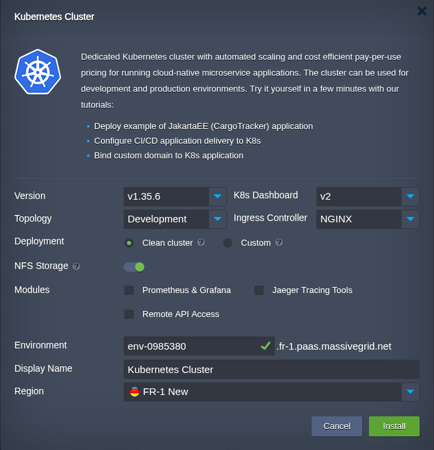
Installing the package takes three steps and a few minutes of waiting. No servers to provision, no configuration files to edit.
Open the installer
Click Install with free trial or Install to my account. The MassiveGRID PaaS dashboard opens with the Kubernetes Cluster package pre-selected, so nothing has to be copied or pasted.
Sign up or sign in
New to the platform? Sign up for the free 14-day trial, which needs no credit card. Existing customers sign in with their usual dashboard credentials.
Choose region and deploy
Name the environment, pick New York, London, Frankfurt or Singapore, and confirm. The platform builds every Kubernetes Cluster node, wires them together and hands you the live URL and credentials.
Who Runs Kubernetes Cluster on PaaS
Microservice platforms
Teams running containerised services that want Kubernetes without cloud-provider lock-in.
Development and CI clusters
Per-team or per-project clusters that scale to zero cost when idle via the Start/Stop Scheduler.
Sovereign container platforms
Organisations that must run Kubernetes in a specific jurisdiction on infrastructure they can audit.
Why Run Kubernetes Cluster on MassiveGRID PaaS
No control-plane fee. The managed clouds charge per cluster-hour on top of the nodes; here the control plane is an ordinary node billed by the cloudlet. A development cluster costs about $78.72 a month, which the control-plane bill post compares.
Workers scale on a trigger and are billed for their hours. A worker added for a deploy and removed after it costs the hours between; a cluster hibernated outside working hours costs its hours. The requirements guide sizes the pool from pod requests.
A cluster per pull request is affordable. Clone, test, delete, as the ephemeral clusters post automates, because a small cluster for an hour is cents.
One jurisdiction, by construction. Every node, volume and the etcd state stay in the region you choose, which is the sovereign cluster post.
Related on massivegrid.com: Managed Kubernetes Hosting · Docker Hosting.
Kubernetes Cluster Questions
Kubernetes Cluster Guides from the MassiveGRID Blog
Scenario-driven guides on running Kubernetes Cluster on MassiveGRID PaaS, written for the developers, operators and buyers who deploy it. Browse the blog.
More from the Marketplace
Packages that are often deployed alongside Kubernetes Cluster, or that solve the same problem a different way. Browse all 83 packages.


Deploy Kubernetes Cluster Today
Start the free 14-day trial and have Kubernetes Cluster running in minutes. No credit card required.