
Mattermost Hosting on MassiveGRID PaaS
Mattermost is an open-source, self-hosted team messaging platform: channels, direct messages, threads, file sharing, search, voice calls and integrations with DevOps tools, positioned as a private alternative to Slack and Microsoft Teams. The MassiveGRID PaaS package deploys Mattermost with its database in one click.
Mattermost on MassiveGRID PaaS installs in one click in New York, London, Frankfurt or Singapore, costs about $59.04 a month for the Starter configuration, a Mattermost server (2 GiB) and a Database (1 GiB), and starts with a 14-day free trial. See the sizing table.
Both buttons open the MassiveGRID PaaS dashboard with Mattermost pre-selected. Sign up without a card, name the environment, pick a region, and the package installs in a few minutes.
Mattermost Package Facts
| Attribute | Value |
|---|---|
| Package | Mattermost Chat Service |
| Type | Application (installs a complete environment) |
| Category | Collaboration & Projects |
| Software vendor / project | Mattermost, Inc. |
| Licence | MIT / AGPLv3 (Team Edition and Free plan, open source) |
| Runtime / stack | Mattermost server (Go) with PostgreSQL or MySQL database and persistent file storage |
| Regions | New York, London, Frankfurt, Singapore |
| Billing | Pay-per-use, about $59.04/month for the Starter configuration (24 cloudlets at $0.003372 per cloudlet-hour), no licence fee |
| Free trial | 14 days, no credit card |
| Uptime SLA | 100% |
What is Mattermost?
Mattermost is written in Go and used by organisations that cannot put internal conversations on a third-party SaaS: defence, finance, healthcare, government and engineering teams. It offers desktop and mobile apps, playbooks for incident response, boards for task tracking, webhooks and slash commands, and integrations with GitLab, Jira, Jenkins and hundreds of other tools.
The package deploys the Mattermost server with a PostgreSQL or MySQL database and persistent storage for uploaded files, exposes it over HTTPS and creates the first system administrator on first login. Vertical auto-scaling handles growth in users and message volume, and the whole environment can be snapshotted before upgrades.
What the Mattermost Package Deploys
Marketplace packages are not bare container images. One click provisions a complete, production-shaped environment on MassiveGRID infrastructure. How these nodes are sized and what they cost.
- Mattermost server: The Go-based Mattermost server on a dedicated node with process management.
- Database: A linked PostgreSQL or MySQL container holding users, channels and messages.
- File storage: Persistent disk for uploads and attachments, expandable from the dashboard.
- Built-in domain and SSL: Web, desktop and mobile clients connect over HTTPS immediately; attach your own domain via Let's Encrypt.
What Mattermost Costs to Run
Three starting configurations for the Mattermost package, sized in cloudlets (1 cloudlet = 128 MiB RAM + 400 MHz CPU) and priced at the published rate of $0.003372 per cloudlet-hour, or $2.46 per cloudlet-month.
| Configuration | Topology | Cloudlets | Est. per month |
|---|---|---|---|
| StarterUp to a few dozen users | Mattermost server (16 cloudlets, 2 GiB), Database (8 cloudlets, 1 GiB) | 24 | $59.04 |
| StandardA few hundred users | Mattermost server (32 cloudlets, 4 GiB), Database (16 cloudlets, 2 GiB) | 48 | $118.08 |
| ProductionLarge teams with heavy file sharing | NGINX load balancer (4 cloudlets, 512 MiB), 2 × Mattermost server (32 cloudlets, 4 GiB each), Database (24 cloudlets, 3 GiB) | 92 | $226.32 |
Estimates assume the environment averages the listed cloudlets around the clock; billing is hourly, vertical auto-scaling lowers the figure when the application is idle, and volume discounts apply as usage grows. Disk and external traffic are billed per gigabyte on top. No licence fee applies to the package. Pick a row in the installer by setting the cloudlet limits per node, or start small and let auto-scaling grow it. Price a different topology or a working-hours schedule in the PaaS pricing calculator; the PaaS page describes the billing model.
Mattermost on MassiveGRID PaaS vs Mattermost Cloud Enterprise and seat licences vs a VPS
The same application three ways: the marketplace package here, the vendor's own hosted offer, and a server you run yourself. Mattermost Cloud Enterprise and seat licences figures were read from the vendor's page on 1 November 2026; re-check them before relying on them.
| Aspect | Mattermost on MassiveGRID PaaS | Mattermost Cloud Enterprise and seat licences | A plain VPS |
|---|---|---|---|
| Monthly cost | About $59.04 (Starter) to $226.32 (Production), before discounts; the free edition has no seat fee | Not published; quoted by sales. Professional and Enterprise are prepaid annual seat licences; Cloud Enterprise is a single-tenant hosted option for the Enterprise tier | A 2 to 4 GB server's monthly price; plus your time |
| What you manage | The application inside the containers (updates, configuration); the platform runs the infrastructure, scaling and the 100% uptime SLA | Cloud Enterprise: Mattermost runs it; seat licences: you run the server | Everything: OS, runtime, database, TLS, backups, upgrades |
| Limits and metering | Unlimited users on the free edition; group calls about 50 concurrent users per server per Mattermost | Seats licensed annually, grown by quarterly true-forward purchases | No metering; limited by the server's size |
| Scaling | Vertical by the cloudlet, automatic and without restart; horizontal on a trigger behind the platform's load balancer | Cloud Enterprise: Mattermost's; self-hosted licence: your server | Resize the server, usually with a reboot; no horizontal scaling without your own load balancer |
| Data location | New York, London, Frankfurt or Singapore, chosen at install; data stays there | Cloud Enterprise: Mattermost's hosting; otherwise your server | Wherever the VPS is; one server, one location |
| Backups | Database Backup/Restore and Backup Storage add-ons on a schedule, environment clone for rehearsals | Cloud Enterprise: Mattermost's; otherwise yours | Your own cron jobs and off-server copies |
| Availability | 100% uptime SLA, nodes on separate hosts, failed containers restarted or migrated | Per contract | Single server; the provider's hardware SLA only |
| Lock-in | Standard JPS manifest and root access; export the manifest or move the containers at any time | Bulk export tooling exists; compliance exports on paid tiers | None; you own the server |
Where Mattermost Cloud Enterprise and seat licences is the better choice: Mattermost's paid tiers are the right answer when the team needs compliance exports, high availability certified by the vendor, or support with a contract behind it; the server can still be the package here, since self-hosted is Mattermost's default model.
Why Teams Choose Mattermost
Slack-style messaging
Channels, threads, reactions, mentions, search and unlimited message history.
Built for technical teams
Code snippets, markdown, webhooks, slash commands and native GitLab, Jira and Jenkins integrations.
Playbooks and boards
Incident-response checklists and kanban boards built into the platform.
Complete data control
Messages and files stay in your MassiveGRID region with your retention and compliance rules.
How to Install Mattermost on MassiveGRID PaaS
Installing the package takes three steps and a few minutes of waiting. No servers to provision, no configuration files to edit.
Open the installer
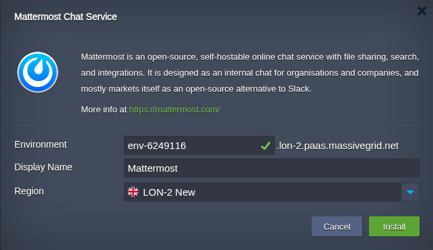
Click Install with free trial or Install to my account. The MassiveGRID PaaS dashboard opens with the Mattermost package pre-selected, so nothing has to be copied or pasted.
Sign up or sign in
New to the platform? Sign up for the free 14-day trial, which needs no credit card. Existing customers sign in with their usual dashboard credentials.
Choose region and deploy
Name the environment, pick New York, London, Frankfurt or Singapore, and confirm. The platform builds every Mattermost node, wires them together and hands you the live URL and credentials.
Who Runs Mattermost on PaaS
Regulated organisations
Teams whose conversations must stay on infrastructure they control.
DevOps and engineering teams
ChatOps with alerts, deploy notifications and incident playbooks.
Companies leaving Slack pricing
Organisations wanting unlimited history and users without per-seat fees.
Why Run Mattermost on MassiveGRID PaaS
Chat has no seat price here. Mattermost's paid tiers are annual seat licences and its only cloud offering is single-tenant Enterprise; the free edition on the package bills the cloudlets the server uses, so a 200-person team pays for one server, not 200 seats. The Slack replacement post does the arithmetic.
Files are the cost that grows, and they are on their own volume. Screenshots, attachments and call recordings are billed per gigabyte on persistent storage that resizes without downtime; the server and database stay small.
The chat history never leaves the region. Deploy in Frankfurt or London and every message, file and search index stays there, which is the question a works council or a regulator asks first.
Monthly releases are a redeploy with a rehearsal. Clone, upgrade the clone, upgrade production; the production hardening post covers TLS, the public address for mobile push and backups.
Related on massivegrid.com: Mattermost Cloud Alternative · Mattermost Hosting · Security Overview.
Mattermost Questions
Mattermost Guides from the MassiveGRID Blog
Scenario-driven guides on running Mattermost on MassiveGRID PaaS, written for the developers, operators and buyers who deploy it. Browse the blog.
More from the Marketplace
Packages that are often deployed alongside Mattermost, or that solve the same problem a different way. Browse all 83 packages.


Deploy Mattermost Today
Start the free 14-day trial and have Mattermost running in minutes. No credit card required.