
Jitsi Meet Hosting on MassiveGRID PaaS
Jitsi Meet is an open-source video conferencing platform that runs in the browser with no accounts or downloads for participants. The MassiveGRID PaaS package deploys a complete Jitsi server (web front end, XMPP signalling, conference focus and video bridge) on a dedicated node with a public IP, giving you private meetings with no per-user fees.
Jitsi Meet on MassiveGRID PaaS installs in one click in New York, London, Frankfurt or Singapore, costs about $78.72 a month for the Starter configuration, a Jitsi Meet web front end (1 GiB), a Prosody and Jicofo (1 GiB) and a Jitsi Videobridge (2 GiB), and starts with a 14-day free trial. See the sizing table.
Both buttons open the MassiveGRID PaaS dashboard with Jitsi Meet pre-selected. Sign up without a card, name the environment, pick a region, and the package installs in a few minutes.
Jitsi Meet Package Facts
| Attribute | Value |
|---|---|
| Package | Jitsi Video Conferencing |
| Type | Application (installs a complete environment) |
| Category | Collaboration & Projects |
| Software vendor / project | 8x8, Inc. (Jitsi project) |
| Licence | Apache License 2.0 (open source) |
| Runtime / stack | Jitsi Meet web, Prosody XMPP, Jicofo and Jitsi Videobridge on a dedicated node with public IP |
| Regions | New York, London, Frankfurt, Singapore |
| Billing | Pay-per-use, about $78.72/month for the Starter configuration (32 cloudlets at $0.003372 per cloudlet-hour), no licence fee |
| Free trial | 14 days, no credit card |
| Uptime SLA | 100% |
What is Jitsi Meet?
Jitsi Meet powers meet.jit.si and is embedded in products from 8x8, Rocket.Chat and many others. It provides HD video and audio, screen sharing, chat, recording and live streaming, breakout rooms and end-to-end encryption options, all through WebRTC in the browser. Self-hosting gives organisations control over meeting data, branding and capacity.
A working Jitsi deployment needs several components correctly wired together with a public IP and the right UDP ports. The package handles that: it deploys the web front end, Prosody XMPP server, Jicofo and Jitsi Videobridge on a node with a public address, configures SSL, and leaves you a URL where meetings start immediately. Vertical auto-scaling adds capacity as concurrent meetings grow.
What the Jitsi Meet Package Deploys
Marketplace packages are not bare container images. One click provisions a complete, production-shaped environment on MassiveGRID infrastructure. How these nodes are sized and what they cost.
- Jitsi Meet web front end: The browser interface served over HTTPS with the platform certificate or your own domain.
- Prosody XMPP and Jicofo: Signalling server and conference focus component managing rooms and participants.
- Jitsi Videobridge: The selective forwarding unit that relays audio and video streams, with the required UDP port open.
- Public IP: A dedicated public address so participants behind NAT connect reliably.
What Jitsi Meet Costs to Run
Three starting configurations for the Jitsi Meet package, sized in cloudlets (1 cloudlet = 128 MiB RAM + 400 MHz CPU) and priced at the published rate of $0.003372 per cloudlet-hour, or $2.46 per cloudlet-month. The Jitsi handbook says 8 GB is usually suggested for a server, 4 GB works for small meetings and 2 GB for tests, and that Prosody uses a single core; the videobridge carries the media streams, so it is the node to grow, and the Production row runs two bridges.
| Configuration | Topology | Cloudlets | Est. per month |
|---|---|---|---|
| StarterSmall meetings | Jitsi Meet web front end (8 cloudlets, 1 GiB), Prosody and Jicofo (8 cloudlets, 1 GiB), Jitsi Videobridge (16 cloudlets, 2 GiB) | 32 | $78.72 |
| StandardSeveral concurrent meetings | Jitsi Meet web front end (8 cloudlets, 1 GiB), Prosody and Jicofo (8 cloudlets, 1 GiB), Jitsi Videobridge (32 cloudlets, 4 GiB) | 48 | $118.08 |
| ProductionClassrooms and large calls | Jitsi Meet web front end (16 cloudlets, 2 GiB), Prosody and Jicofo (16 cloudlets, 2 GiB), 2 × Jitsi Videobridge (48 cloudlets, 6 GiB each) | 128 | $314.88 |
Estimates assume the environment averages the listed cloudlets around the clock; billing is hourly, vertical auto-scaling lowers the figure when the application is idle, and volume discounts apply as usage grows. Disk and external traffic are billed per gigabyte on top. No licence fee applies to the package. Pick a row in the installer by setting the cloudlet limits per node, or start small and let auto-scaling grow it. Price a different topology or a working-hours schedule in the PaaS pricing calculator; the PaaS page describes the billing model.
Jitsi Meet on MassiveGRID PaaS vs Jitsi as a Service (8x8) vs a VPS
The same application three ways: the marketplace package here, the vendor's own hosted offer, and a server you run yourself. Jitsi as a Service (8x8) figures were read from the vendor's page on 1 November 2026; re-check them before relying on them.
| Aspect | Jitsi Meet on MassiveGRID PaaS | Jitsi as a Service (8x8) | A plain VPS |
|---|---|---|---|
| Monthly cost | About $78.72 (Starter) to $314.88 (Production, two bridges), before discounts, plus outbound traffic per gigabyte; Jitsi has no licence fee | Not checked (page could not be read). JaaS is priced per monthly active user with a free tier; check the current table | A 4 to 8 GB server's monthly price and its traffic allowance; plus your time |
| What you manage | The application inside the containers (updates, configuration); the platform runs the infrastructure, scaling and the 100% uptime SLA | Nothing; 8x8 runs the bridges | Everything: OS, runtime, database, TLS, backups, upgrades |
| Limits and metering | No user metering; capacity is the bridge's cloudlets and bandwidth | Monthly active users per tier | No metering; limited by the server's size |
| Scaling | Vertical by the cloudlet, automatic and without restart; horizontal on a trigger behind the platform's load balancer | 8x8's infrastructure | Resize the server, usually with a reboot; no horizontal scaling without your own load balancer |
| Data location | New York, London, Frankfurt or Singapore, chosen at install; data stays there | 8x8's regions | Wherever the VPS is; one server, one location |
| Backups | Database Backup/Restore and Backup Storage add-ons on a schedule, environment clone for rehearsals | Not applicable (no stored meeting data by default) | Your own cron jobs and off-server copies |
| Availability | 100% uptime SLA, nodes on separate hosts, failed containers restarted or migrated | 8x8's availability commitment | Single server; the provider's hardware SLA only |
| Lock-in | Standard JPS manifest and root access; export the manifest or move the containers at any time | Low; the client API is the same Jitsi | None; you own the server |
Where Jitsi as a Service (8x8) is the better choice: JaaS is the right answer for embedding a few meetings in an app without running media servers, where the monthly-active-user count is small and the bridges' location does not matter.
Why Teams Choose Jitsi Meet
No accounts for guests
Participants join from a link in any modern browser; mobile apps are available.
Full-featured meetings
Screen sharing, chat, hand raising, breakout rooms, recording and YouTube streaming.
Privacy and branding
Meeting media never touches a third party, and the interface can carry your logo and domain.
Unlimited users
Capacity is bound by resources, not licences; scale the node or add video bridges.
How to Install Jitsi Meet on MassiveGRID PaaS
Installing the package takes three steps and a few minutes of waiting. No servers to provision, no configuration files to edit.
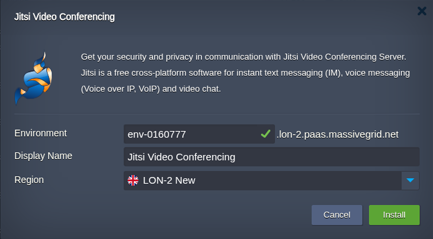
Open the installer
Click Install with free trial or Install to my account. The MassiveGRID PaaS dashboard opens with the Jitsi Meet package pre-selected, so nothing has to be copied or pasted.
Sign up or sign in
New to the platform? Sign up for the free 14-day trial, which needs no credit card. Existing customers sign in with their usual dashboard credentials.
Choose region and deploy
Name the environment, pick New York, London, Frankfurt or Singapore, and confirm. The platform builds every Jitsi Meet node, wires them together and hands you the live URL and credentials.
Who Runs Jitsi Meet on PaaS
Privacy-conscious organisations
Law firms, healthcare and public bodies that cannot use public conferencing services.
Education
Schools running virtual classrooms, often integrated with Moodle.
Companies with many meetings
Teams avoiding per-host subscription fees for internal and client calls.
Why Run Jitsi Meet on MassiveGRID PaaS
Meetings are not priced per user. The package bills the cloudlets the three Jitsi services use, and outbound video traffic per gigabyte; nobody counts monthly active users. The requirements guide applies the handbook's bitrates.
The videobridge scales out, as the handbook recommends. A second bridge is a horizontal trigger on the bridge layer, added for a conference day and removed afterwards; the Production row starts with two.
Meetings stay in your jurisdiction. The bridge and the signalling live in the region you choose, with a public IP of their own, which is the privacy case the law firm comparison makes.
Only your users can start a room. JWT authentication against Moodle, Mattermost or your identity provider, which the integration post sets up, is a configuration on the node rather than a paid tier.
Related on massivegrid.com: Jitsi Meet Hosting · Education Hosting.
Jitsi Meet Questions
Jitsi Meet Guides from the MassiveGRID Blog
Scenario-driven guides on running Jitsi Meet on MassiveGRID PaaS, written for the developers, operators and buyers who deploy it. Browse the blog.
More from the Marketplace
Packages that are often deployed alongside Jitsi Meet, or that solve the same problem a different way. Browse all 83 packages.


Deploy Jitsi Meet Today
Start the free 14-day trial and have Jitsi Meet running in minutes. No credit card required.