
Moodle Hosting on MassiveGRID PaaS
Moodle is the world's most widely used open-source learning management system, running courses for hundreds of millions of learners at schools, universities and companies. The MassiveGRID PaaS package installs Moodle with a PHP server and database in one click, and auto-scales for enrolment and exam peaks.
Moodle on MassiveGRID PaaS installs in one click in New York, London, Frankfurt or Singapore, costs about $29.52 a month for the Starter configuration, a PHP application server (1 GiB) and a Database (512 MiB), and starts with a 14-day free trial. See the sizing table.
Both buttons open the MassiveGRID PaaS dashboard with Moodle pre-selected. Sign up without a card, name the environment, pick a region, and the package installs in a few minutes.
Moodle Package Facts
| Attribute | Value |
|---|---|
| Package | Moodle |
| Type | Application (installs a complete environment) |
| Category | Websites & CMS |
| Software vendor / project | Moodle Pty Ltd |
| Licence | GPLv3 or later (open source) |
| Runtime / stack | PHP application server, MySQL/MariaDB or PostgreSQL |
| Regions | New York, London, Frankfurt, Singapore |
| Billing | Pay-per-use, about $29.52/month for the Starter configuration (12 cloudlets at $0.003372 per cloudlet-hour), no licence fee |
| Free trial | 14 days, no credit card |
| Uptime SLA | 100% |
What is Moodle?
Moodle provides everything an online course needs: content pages, assignments with grading workflows, quizzes with question banks, forums, competencies, badges, and integrations with video conferencing, plagiarism checkers and student information systems through LTI and web services. Its plugin directory has more than 2,000 entries, and institutions customise it heavily.
The operational challenge of Moodle is load that arrives in waves: term start, assignment deadlines and exam windows can multiply traffic many times over in an hour. Pay-per-use PaaS with vertical auto-scaling fits that pattern better than a fixed server. The package deploys Moodle with a tuned PHP server and database, and the environment can be extended with Redis caching and additional web nodes when a single server is no longer enough.
What the Moodle Package Deploys
Marketplace packages are not bare container images. One click provisions a complete, production-shaped environment on MassiveGRID infrastructure. How these nodes are sized and what they cost.
- PHP application server: Apache or NGINX with PHP-FPM, OPcache and Moodle's required extensions (intl, soap, xmlrpc, zip and others), with upload limits raised for course files.
- Database: A linked MySQL/MariaDB or PostgreSQL container with credentials pre-filled in Moodle's configuration.
- Moodledata storage: Persistent storage for uploaded files, backups and caches, outside the web root as Moodle requires.
- Built-in domain and SSL: Learners connect over HTTPS immediately; attach your institution's domain with Let's Encrypt.
What Moodle Costs to Run
Three starting configurations for the Moodle package, sized in cloudlets (1 cloudlet = 128 MiB RAM + 400 MHz CPU) and priced at the published rate of $0.003372 per cloudlet-hour, or $2.46 per cloudlet-month. Moodle publishes 512 MB as the memory minimum and 1 GB or more as the recommendation, with 8 GB or more on a large production server; concurrent users, not enrolled users, drive the allocation, and exam weeks need the Production row or horizontal scaling.
| Configuration | Topology | Cloudlets | Est. per month |
|---|---|---|---|
| StarterEvaluation and small teams | PHP application server (8 cloudlets, 1 GiB), Database (4 cloudlets, 512 MiB) | 12 | $29.52 |
| StandardA team in daily use | PHP application server (16 cloudlets, 2 GiB), Database (8 cloudlets, 1 GiB) | 24 | $59.04 |
| ProductionHigh traffic, scaled horizontally | NGINX load balancer (4 cloudlets, 512 MiB), 2 × PHP application server (24 cloudlets, 3 GiB each), Database (16 cloudlets, 2 GiB) | 68 | $167.28 |
Estimates assume the environment averages the listed cloudlets around the clock; billing is hourly, vertical auto-scaling lowers the figure when the application is idle, and volume discounts apply as usage grows. Disk and external traffic are billed per gigabyte on top. No licence fee applies to the package. Pick a row in the installer by setting the cloudlet limits per node, or start small and let auto-scaling grow it. Price a different topology or a working-hours schedule in the PaaS pricing calculator; the PaaS page describes the billing model.
Moodle on MassiveGRID PaaS vs MoodleCloud vs a VPS
The same application three ways: the marketplace package here, the vendor's own hosted offer, and a server you run yourself. MoodleCloud figures were read from the vendor's page on 1 November 2026; re-check them before relying on them.
| Aspect | Moodle on MassiveGRID PaaS | MoodleCloud | A plain VPS |
|---|---|---|---|
| Monthly cost | About $29.52 (Starter) to $167.28 (Production), before discounts; Moodle has no licence fee | Not checked (page could not be read). MoodleCloud sells annual plans by user count and storage; compare the plan for your enrolment | A 1 to 4 GB server's monthly price; plus your time |
| What you manage | The application inside the containers (updates, configuration); the platform runs the infrastructure, scaling and the 100% uptime SLA | Nothing; Moodle HQ runs it, with plugin restrictions | Everything: OS, runtime, database, TLS, backups, upgrades |
| Limits and metering | Unlimited users; capacity is the environment's cloudlets | Users and storage per plan; limited plugin installation | No metering; limited by the server's size |
| Scaling | Vertical by the cloudlet, automatic and without restart; horizontal on a trigger behind the platform's load balancer | Buy a larger plan | Resize the server, usually with a reboot; no horizontal scaling without your own load balancer |
| Data location | New York, London, Frankfurt or Singapore, chosen at install; data stays there | MoodleCloud's hosting regions | Wherever the VPS is; one server, one location |
| Backups | Database Backup/Restore and Backup Storage add-ons on a schedule, environment clone for rehearsals | Moodle HQ's responsibility; course backups exportable | Your own cron jobs and off-server copies |
| Availability | 100% uptime SLA, nodes on separate hosts, failed containers restarted or migrated | MoodleCloud's availability commitment | Single server; the provider's hardware SLA only |
| Lock-in | Standard JPS manifest and root access; export the manifest or move the containers at any time | Course backups and user exports are standard Moodle formats | None; you own the server |
Where MoodleCloud is the better choice: MoodleCloud is the right answer for a small school without an IT administrator, where the plugin restrictions do not bite and someone else running updates is worth the per-user price.
Why Teams Choose Moodle
Complete LMS feature set
Courses, quizzes, assignments, gradebook, forums, competencies, badges and H5P interactive content out of the box.
Scales for exam day
Vertical auto-scaling adds cloudlets during peaks; horizontal scaling with a load balancer and shared moodledata is available for large institutions.
Integrations
LTI, SCORM, web services and plugins for BigBlueButton, Zoom, Turnitin, Microsoft 365 and Google Workspace.
Learner data under your control
Host in New York, London, Frankfurt or Singapore to meet FERPA, GDPR or national education-data rules.
How to Install Moodle on MassiveGRID PaaS
Installing the package takes three steps and a few minutes of waiting. No servers to provision, no configuration files to edit.
Open the installer
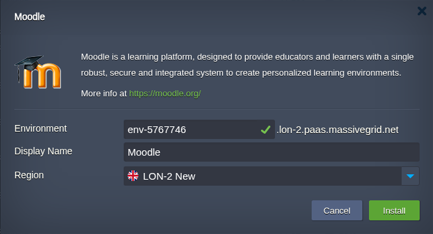
Click Install with free trial or Install to my account. The MassiveGRID PaaS dashboard opens with the Moodle package pre-selected, so nothing has to be copied or pasted.
Sign up or sign in
New to the platform? Sign up for the free 14-day trial, which needs no credit card. Existing customers sign in with their usual dashboard credentials.
Choose region and deploy
Name the environment, pick New York, London, Frankfurt or Singapore, and confirm. The platform builds every Moodle node, wires them together and hands you the live URL and credentials.
Who Runs Moodle on PaaS
Schools and universities
Institutions running thousands of courses with predictable term-time peaks.
Corporate training
Companies delivering compliance and skills training with completion tracking and certificates.
Training providers and course sellers
Organisations selling courses online, often paired with WordPress or an e-commerce front end.
Why Run Moodle on MassiveGRID PaaS
Concurrent users, not enrolments, set the bill. The PHP node scales by the cloudlet with the people in Moodle right now, and exam week runs on more nodes behind the load balancer for the days it lasts. The requirements guide sizes three institutions.
Plugins and integrations are yours to install. Root access to the PHP node means any plugin, any theme and any SSO or SIS integration, which hosted LMS plans restrict.
moodledata grows on its own volume, billed per gigabyte and resized without downtime, with course backups retained by a policy rather than by the disk running out.
Twice-yearly Moodle releases get a rehearsal. The upgrade post clones production, upgrades the clone with real course data and only then touches the live site.
Related on massivegrid.com: Moodle Hosting · Education Managed Hosting · Platform as a Service.
Moodle Questions
Moodle Guides from the MassiveGRID Blog
Scenario-driven guides on running Moodle on MassiveGRID PaaS, written for the developers, operators and buyers who deploy it. Browse the blog.
More from the Marketplace
Packages that are often deployed alongside Moodle, or that solve the same problem a different way. Browse all 83 packages.


Deploy Moodle Today
Start the free 14-day trial and have Moodle running in minutes. No credit card required.