
Multi-Region WordPress Cluster Hosting on MassiveGRID PaaS
The Multi-Region WordPress Cluster deploys a complete WordPress cluster in two or more MassiveGRID regions and keeps them synchronised, so visitors are served from the nearest region and a whole-region outage does not take the site offline. It is an alpha package aimed at teams that already run clustered WordPress and need geographic redundancy.
Multi-Region WordPress Cluster on MassiveGRID PaaS installs in one click in New York, London, Frankfurt or Singapore, costs about $118.08 a month for the Starter configuration, 2 × Load balancer per region (512 MiB each), 2 × Application server per region (1 GiB each), 2 × Database node per region (1 GiB each) and 2 × Shared storage per region (512 MiB each), and starts with a 14-day free trial. See the sizing table.
Both buttons open the MassiveGRID PaaS dashboard with Multi-Region WordPress Cluster pre-selected. Sign up without a card, name the environment, pick a region, and the package installs in a few minutes.
Multi-Region WordPress Cluster Package Facts
| Attribute | Value |
|---|---|
| Package | Multi-Region WordPress Cluster v1 (Alpha) |
| Type | Application (installs a complete environment) |
| Category | Websites & CMS |
| Software vendor / project | WordPress.org |
| Licence | GPLv2 or later (open source) |
| Runtime / stack | Per-region WordPress clusters (load balancer, PHP app servers, MariaDB) joined by cross-region database replication and file sync |
| Regions | New York, London, Frankfurt, Singapore |
| Billing | Pay-per-use, about $118.08/month for the Starter configuration (48 cloudlets at $0.003372 per cloudlet-hour), no licence fee |
| Free trial | 14 days, no credit card |
| Uptime SLA | 100% |
What is Multi-Region WordPress Cluster?
A conventional cluster protects you against a failed server. It does not protect you against a failed region, a regional network incident or the latency that users on another continent experience. The Multi-Region WordPress Cluster answers that by installing a full cluster (load balancer, application servers, database) in each region you select and linking the regions with database replication and file synchronisation.
The package is marked alpha by its maintainers because cross-region replication of a write-heavy application such as WordPress has trade-offs, especially around write latency and conflict handling. It is well suited to content sites, documentation portals and marketing platforms that publish from one place and read from everywhere. If you need a single-region cluster, use the WordPress Cluster Kit instead.
What the Multi-Region WordPress Cluster Package Deploys
Marketplace packages are not bare container images. One click provisions a complete, production-shaped environment on MassiveGRID infrastructure. How these nodes are sized and what they cost.
- One cluster per region: Each selected region receives its own load balancer, PHP application servers and MariaDB nodes, so every region can serve the full site on its own.
- Cross-region database replication: MariaDB nodes in different regions replicate to each other, so content published in one region appears in the others.
- File synchronisation: Uploads, themes and plugins are synchronised between regions so media and code stay consistent.
- Regional entry points: Each region exposes its own endpoint. Combine them with a geo-DNS or CDN service to route users to their closest region.
What Multi-Region WordPress Cluster Costs to Run
Three starting configurations for the Multi-Region WordPress Cluster package, sized in cloudlets (1 cloudlet = 128 MiB RAM + 400 MHz CPU) and priced at the published rate of $0.003372 per cloudlet-hour, or $2.46 per cloudlet-month.
| Configuration | Topology | Cloudlets | Est. per month |
|---|---|---|---|
| StarterTwo regions, minimal cluster each | 2 × Load balancer per region (4 cloudlets, 512 MiB each), 2 × Application server per region (8 cloudlets, 1 GiB each), 2 × Database node per region (8 cloudlets, 1 GiB each), 2 × Shared storage per region (4 cloudlets, 512 MiB each) | 48 | $118.08 |
| StandardTwo regions, scaled application tier | 2 × Load balancer per region (4 cloudlets, 512 MiB each), 4 × Application server per region (16 cloudlets, 2 GiB each), 2 × Database node per region (16 cloudlets, 2 GiB each), 2 × Shared storage per region (4 cloudlets, 512 MiB each) | 112 | $275.52 |
| ProductionThree regions | 3 × Load balancer per region (4 cloudlets, 512 MiB each), 6 × Application server per region (16 cloudlets, 2 GiB each), 3 × Database node per region (16 cloudlets, 2 GiB each), 3 × Shared storage per region (8 cloudlets, 1 GiB each) | 180 | $442.80 |
Estimates assume the environment averages the listed cloudlets around the clock; billing is hourly, vertical auto-scaling lowers the figure when the application is idle, and volume discounts apply as usage grows. Disk and external traffic are billed per gigabyte on top. No licence fee applies to the package. Pick a row in the installer by setting the cloudlet limits per node, or start small and let auto-scaling grow it. Price a different topology or a working-hours schedule in the PaaS pricing calculator; the PaaS page describes the billing model.
Why Teams Choose Multi-Region WordPress Cluster
Survive a regional outage
If an entire region is unreachable, the remaining regions continue serving the site from their own copies of the database and files.
Lower latency worldwide
Serve European visitors from Frankfurt or London, American visitors from New York and Asian visitors from Singapore, all from one WordPress install.
Data residency by design
Choose which MassiveGRID regions hold data. Keep EU visitors' sessions in Frankfurt while still publishing globally.
Same kit, more regions
Uses the same building blocks as the single-region Cluster Kit, so administration, scaling and add-ons work the way you already know.
How to Install Multi-Region WordPress Cluster on MassiveGRID PaaS
Installing the package takes three steps and a few minutes of waiting. No servers to provision, no configuration files to edit.
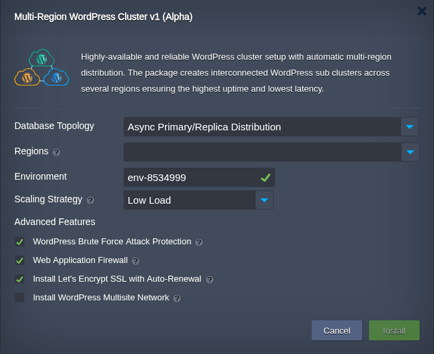
Open the installer
Click Install with free trial or Install to my account. The MassiveGRID PaaS dashboard opens with the Multi-Region WordPress Cluster package pre-selected, so nothing has to be copied or pasted.
Sign up or sign in
New to the platform? Sign up for the free 14-day trial, which needs no credit card. Existing customers sign in with their usual dashboard credentials.
Choose region and deploy
Name the environment, pick New York, London, Frankfurt or Singapore, and confirm. The platform builds every Multi-Region WordPress Cluster node, wires them together and hands you the live URL and credentials.
Who Runs Multi-Region WordPress Cluster on PaaS
Global content and media brands
Publishers with audiences on several continents that want local response times without separate WordPress installs.
Disaster-recovery requirements
Organisations whose continuity plans demand a live secondary site in another jurisdiction, not just a backup.
Multi-national corporate sites
One editorial team, one CMS, served locally to offices and customers in North America, Europe and Asia.
Why Run Multi-Region WordPress Cluster on MassiveGRID PaaS
Built for uptime. Multi-Region WordPress Cluster runs on MassiveGRID's high-availability platform, where every environment is covered by a 100% uptime SLA. Nodes live on redundant hosts, storage is replicated, and failed containers are restarted or migrated automatically.
Pay for what you use. Billing is hourly and per cloudlet (128 MiB RAM plus 400 MHz CPU). Vertical auto-scaling adds and removes cloudlets as load changes, so a quiet Multi-Region WordPress Cluster environment costs a few dollars a month and a busy one grows without a migration. Full details are on the PaaS page.
Your choice of jurisdiction. Deploy in New York, London, Frankfurt or Singapore and keep data inside the region your users or regulators require. MassiveGRID is ISO 27001 and ISO 9001 certified and GDPR compliant, and has run hosting infrastructure since 2003.
No lock-in. The package is a standard Jelastic Packaging Standard (JPS) manifest. You keep root-level access to the containers, can export the manifest, and can move the workload to any other Jelastic-compatible platform or to your own servers at any time.
Related on massivegrid.com: WordPress in PaaS · Disaster Recovery.
Multi-Region WordPress Cluster Questions
Multi-Region WordPress Cluster Guides from the MassiveGRID Blog
Scenario-driven guides on running Multi-Region WordPress Cluster on MassiveGRID PaaS, written for the developers, operators and buyers who deploy it. Browse the blog.
More from the Marketplace
Packages that are often deployed alongside Multi-Region WordPress Cluster, or that solve the same problem a different way. Browse all 83 packages.


Deploy Multi-Region WordPress Cluster Today
Start the free 14-day trial and have Multi-Region WordPress Cluster running in minutes. No credit card required.