
Redmine Hosting on MassiveGRID PaaS
Redmine is a flexible open-source project management and issue tracking application built on Ruby on Rails, with multiple projects, roles, Gantt charts, calendars, wikis, forums, time tracking and integration with Git and Subversion. The MassiveGRID PaaS package deploys Redmine with its Ruby server and database in one click.
Redmine on MassiveGRID PaaS installs in one click in New York, London, Frankfurt or Singapore, costs about $29.52 a month for the Starter configuration, a Ruby on Rails application server (1 GiB) and a Database (512 MiB), and starts with a 14-day free trial. See the sizing table.
Both buttons open the MassiveGRID PaaS dashboard with Redmine pre-selected. Sign up without a card, name the environment, pick a region, and the package installs in a few minutes.
Redmine Package Facts
| Attribute | Value |
|---|---|
| Package | Redmine |
| Type | Application (installs a complete environment) |
| Category | Collaboration & Projects |
| Software vendor / project | Redmine project (Jean-Philippe Lang) |
| Licence | GPLv2 (open source) |
| Runtime / stack | Ruby on Rails application server, MySQL/MariaDB or PostgreSQL |
| Regions | New York, London, Frankfurt, Singapore |
| Billing | Pay-per-use, about $29.52/month for the Starter configuration (12 cloudlets at $0.003372 per cloudlet-hour), no licence fee |
| Free trial | 14 days, no credit card |
| Uptime SLA | 100% |
What is Redmine?
Redmine has been a mainstay of software and engineering teams since 2006. It tracks issues with custom workflows per tracker and role, plans with Gantt charts and roadmaps, hosts a wiki and documents per project, records time, and links commits from Git or Subversion repositories to issues. More than a thousand plugins and themes extend it, including agile boards and CRM modules.
Ruby on Rails applications need a specific Ruby version, bundled gems and an application server such as Puma or Passenger, which is where many self-hosted Redmine installs stall. The package deploys a Ruby application server with Redmine installed and configured against a linked database, so you reach the first login in minutes.
What the Redmine Package Deploys
Marketplace packages are not bare container images. One click provisions a complete, production-shaped environment on MassiveGRID infrastructure. How these nodes are sized and what they cost.
- Ruby on Rails application server: A Ruby container with the Redmine release installed, gems bundled and the application server configured.
- Database: A linked MySQL/MariaDB or PostgreSQL container with credentials configured in Redmine.
- Persistent files: Attachments and repository data on persistent storage with snapshots.
- Built-in domain and SSL: HTTPS on a platform subdomain immediately; attach your own domain via Let's Encrypt.
What Redmine Costs to Run
Three starting configurations for the Redmine package, sized in cloudlets (1 cloudlet = 128 MiB RAM + 400 MHz CPU) and priced at the published rate of $0.003372 per cloudlet-hour, or $2.46 per cloudlet-month.
| Configuration | Topology | Cloudlets | Est. per month |
|---|---|---|---|
| StarterEvaluation and small teams | Ruby on Rails application server (8 cloudlets, 1 GiB), Database (4 cloudlets, 512 MiB) | 12 | $29.52 |
| StandardA team in daily use | Ruby on Rails application server (16 cloudlets, 2 GiB), Database (8 cloudlets, 1 GiB) | 24 | $59.04 |
| ProductionHigh traffic, scaled horizontally | NGINX load balancer (4 cloudlets, 512 MiB), 2 × Ruby on Rails application server (16 cloudlets, 2 GiB each), Database (16 cloudlets, 2 GiB) | 52 | $127.92 |
Estimates assume the environment averages the listed cloudlets around the clock; billing is hourly, vertical auto-scaling lowers the figure when the application is idle, and volume discounts apply as usage grows. Disk and external traffic are billed per gigabyte on top. No licence fee applies to the package. Pick a row in the installer by setting the cloudlet limits per node, or start small and let auto-scaling grow it. Price a different topology or a working-hours schedule in the PaaS pricing calculator; the PaaS page describes the billing model.
Why Teams Choose Redmine
Flexible issue tracking
Custom trackers, statuses, workflows and fields per project and role.
Planning tools
Gantt charts, calendars, roadmaps and versions for release planning.
Repository integration
Browse Git and Subversion repositories and link commits to issues automatically.
Plugins and themes
Agile boards, checklists, CRM and dashboards from a large plugin ecosystem.
How to Install Redmine on MassiveGRID PaaS
Installing the package takes three steps and a few minutes of waiting. No servers to provision, no configuration files to edit.
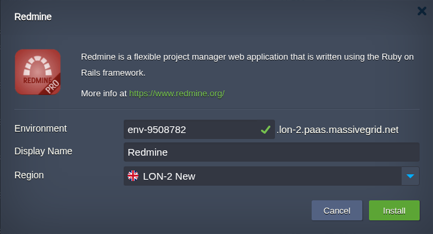
Open the installer
Click Install with free trial or Install to my account. The MassiveGRID PaaS dashboard opens with the Redmine package pre-selected, so nothing has to be copied or pasted.
Sign up or sign in
New to the platform? Sign up for the free 14-day trial, which needs no credit card. Existing customers sign in with their usual dashboard credentials.
Choose region and deploy
Name the environment, pick New York, London, Frankfurt or Singapore, and confirm. The platform builds every Redmine node, wires them together and hands you the live URL and credentials.
Who Runs Redmine on PaaS
Software development teams
Issue tracking tied to source control without SaaS fees.
Engineering and consulting projects
Multi-project tracking with time recording for billing.
Organisations leaving Jira
Teams wanting a self-hosted, open-source tracker they can customise.
Why Run Redmine on MassiveGRID PaaS
Built for uptime. Redmine runs on MassiveGRID's high-availability platform, where every environment is covered by a 100% uptime SLA. Nodes live on redundant hosts, storage is replicated, and failed containers are restarted or migrated automatically.
Pay for what you use. Billing is hourly and per cloudlet (128 MiB RAM plus 400 MHz CPU). Vertical auto-scaling adds and removes cloudlets as load changes, so a quiet Redmine environment costs a few dollars a month and a busy one grows without a migration. Full details are on the PaaS page.
Your choice of jurisdiction. Deploy in New York, London, Frankfurt or Singapore and keep data inside the region your users or regulators require. MassiveGRID is ISO 27001 and ISO 9001 certified and GDPR compliant, and has run hosting infrastructure since 2003.
No lock-in. The package is a standard Jelastic Packaging Standard (JPS) manifest. You keep root-level access to the containers, can export the manifest, and can move the workload to any other Jelastic-compatible platform or to your own servers at any time.
Related on massivegrid.com: For Developers.
Redmine Questions
Redmine Guides from the MassiveGRID Blog
Scenario-driven guides on running Redmine on MassiveGRID PaaS, written for the developers, operators and buyers who deploy it. Browse the blog.
More from the Marketplace
Packages that are often deployed alongside Redmine, or that solve the same problem a different way. Browse all 83 packages.


Deploy Redmine Today
Start the free 14-day trial and have Redmine running in minutes. No credit card required.