
PostgreSQL Cluster Hosting on MassiveGRID PaaS
The PostgreSQL Primary-Secondary Cluster package deploys a PostgreSQL primary with one or more hot-standby secondaries kept in sync by asynchronous streaming replication. Reads can be spread across the secondaries, and a standby can be promoted if the primary fails, all configured for you in one click.
PostgreSQL Cluster on MassiveGRID PaaS installs in one click in New York, London, Frankfurt or Singapore, costs about $39.36 a month for the Starter configuration, a PostgreSQL primary (1 GiB) and a Hot-standby secondary (1 GiB), and starts with a 14-day free trial. See the sizing table.
Both buttons open the MassiveGRID PaaS dashboard with PostgreSQL Cluster pre-selected. Sign up without a card, name the environment, pick a region, and the package installs in a few minutes.
PostgreSQL Cluster Package Facts
| Attribute | Value |
|---|---|
| Package | PostgreSQL Primary-Secondary Cluster |
| Type | Application (installs a complete environment) |
| Category | Databases |
| Software vendor / project | PostgreSQL Global Development Group |
| Licence | PostgreSQL License (open source) |
| Runtime / stack | PostgreSQL primary with one or more streaming-replication secondaries |
| Regions | New York, London, Frankfurt, Singapore |
| Billing | Pay-per-use, about $39.36/month for the Starter configuration (16 cloudlets at $0.003372 per cloudlet-hour), no licence fee |
| Free trial | 14 days, no credit card |
| Uptime SLA | 100% |
What is PostgreSQL Cluster?
PostgreSQL is the most advanced open-source relational database and the default choice for new applications in Django, Rails, Node.js, Odoo and countless SaaS products. Its built-in streaming replication ships write-ahead log records from a primary to standbys in near real time, giving you read replicas and a warm failover target without third-party tools.
The package sets up the replication user, connection slots, WAL settings and standby configuration that PostgreSQL needs, so the cluster is correct from the first minute. It is the natural database layer for other marketplace packages such as Odoo, Django CMS and Cyclos, and can be attached to any environment.
What the PostgreSQL Cluster Package Deploys
Marketplace packages are not bare container images. One click provisions a complete, production-shaped environment on MassiveGRID infrastructure. How these nodes are sized and what they cost.
- PostgreSQL primary: A PostgreSQL container that accepts all writes, with WAL archiving and replication slots configured.
- Hot-standby secondaries: One or more read-only replicas receiving changes by streaming replication within milliseconds.
- Replication configuration: Replication role, authentication and standby settings applied by the installer and verified after deployment.
- Optional encryption: Add the PostgreSQL SSL/TLS add-on to enforce encrypted client connections.
What PostgreSQL Cluster Costs to Run
Three starting configurations for the PostgreSQL Cluster package, sized in cloudlets (1 cloudlet = 128 MiB RAM + 400 MHz CPU) and priced at the published rate of $0.003372 per cloudlet-hour, or $2.46 per cloudlet-month.
| Configuration | Topology | Cloudlets | Est. per month |
|---|---|---|---|
| StarterDevelopment and small applications | PostgreSQL primary (8 cloudlets, 1 GiB), Hot-standby secondary (8 cloudlets, 1 GiB) | 16 | $39.36 |
| StandardProduction databases | PostgreSQL primary (16 cloudlets, 2 GiB), Hot-standby secondary (16 cloudlets, 2 GiB) | 32 | $78.72 |
| ProductionLarge datasets and read scaling | PostgreSQL primary (32 cloudlets, 4 GiB), 2 × Hot-standby secondary (32 cloudlets, 4 GiB each) | 96 | $236.16 |
Estimates assume the environment averages the listed cloudlets around the clock; billing is hourly, vertical auto-scaling lowers the figure when the application is idle, and volume discounts apply as usage grows. Disk and external traffic are billed per gigabyte on top. No licence fee applies to the package. Pick a row in the installer by setting the cloudlet limits per node, or start small and let auto-scaling grow it. Price a different topology or a working-hours schedule in the PaaS pricing calculator; the PaaS page describes the billing model.
PostgreSQL Cluster on MassiveGRID PaaS vs DigitalOcean Managed PostgreSQL (as a managed-database example) vs a VPS
The same application three ways: the marketplace package here, the vendor's own hosted offer, and a server you run yourself. DigitalOcean Managed PostgreSQL (as a managed-database example) figures were read from the vendor's page on 1 November 2026; re-check them before relying on them.
| Aspect | PostgreSQL Cluster on MassiveGRID PaaS | DigitalOcean Managed PostgreSQL (as a managed-database example) | A plain VPS |
|---|---|---|---|
| Monthly cost | About $39.36 (Starter, 1 GiB primary and standby) to $236.16 (Production, 4 GiB primary and two standbys), before discounts | Smallest plan 1 GiB RAM, 1 vCPU at $15.15 a month for a single node; storage $0.215 per GiB; standby nodes priced on request | Two or three servers you configure streaming replication on; plus your time |
| What you manage | The application inside the containers (updates, configuration); the platform runs the infrastructure, scaling and the 100% uptime SLA | Nothing; the provider runs it | Everything: OS, runtime, database, TLS, backups, upgrades |
| Limits and metering | No plan tiers; capacity is the nodes' cloudlets, disk per gigabyte | Plan sizes; connection limits per plan | No metering; limited by the server's size |
| Scaling | Vertical by the cloudlet, automatic and without restart; horizontal on a trigger behind the platform's load balancer | Resize the plan; add nodes at the provider's price | Resize the server, usually with a reboot; no horizontal scaling without your own load balancer |
| Data location | New York, London, Frankfurt or Singapore, chosen at install; data stays there | The provider's regions | Wherever the VPS is; one server, one location |
| Backups | Database Backup/Restore and Backup Storage add-ons on a schedule, environment clone for rehearsals | Included, with point-in-time recovery on most managed offerings | Your own cron jobs and off-server copies |
| Availability | 100% uptime SLA, nodes on separate hosts, failed containers restarted or migrated | The provider's SLA | Single server; the provider's hardware SLA only |
| Lock-in | Standard JPS manifest and root access; export the manifest or move the containers at any time | pg_dump is standard; extensions limited to the provider's list | None; you own the server |
Where DigitalOcean Managed PostgreSQL (as a managed-database example) is the better choice: A managed database is the right answer for a single small instance where $15 a month includes backups and point-in-time recovery and nobody wants to think about it; the package wins once standbys and read scaling enter the picture.
Why Teams Choose PostgreSQL Cluster
Native streaming replication
PostgreSQL's own mechanism, with no plugins or proprietary components to maintain.
Read replicas
Direct reporting and read-heavy queries to secondaries while the primary handles writes.
Failover ready
Promote a standby from the dashboard if the primary is lost; the data is already there.
Elastic resources
Each node scales vertically on demand, so the cluster grows with data and query volume.
How to Install PostgreSQL Cluster on MassiveGRID PaaS
Installing the package takes three steps and a few minutes of waiting. No servers to provision, no configuration files to edit.
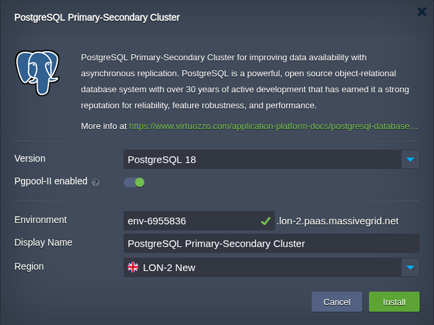
Open the installer
Click Install with free trial or Install to my account. The MassiveGRID PaaS dashboard opens with the PostgreSQL Cluster package pre-selected, so nothing has to be copied or pasted.
Sign up or sign in
New to the platform? Sign up for the free 14-day trial, which needs no credit card. Existing customers sign in with their usual dashboard credentials.
Choose region and deploy
Name the environment, pick New York, London, Frankfurt or Singapore, and confirm. The platform builds every PostgreSQL Cluster node, wires them together and hands you the live URL and credentials.
Who Runs PostgreSQL Cluster on PaaS
Application databases
Odoo, Django, Rails, Node.js and Java applications that need redundancy without changing code.
Reporting offload
Analytics and dashboards reading from a secondary so production latency stays low.
Compliance and DR
Keeping a live standby for recovery point objectives measured in seconds, not hours.
Why Run PostgreSQL Cluster on MassiveGRID PaaS
A primary, standbys and Pgpool-II in one click, which is the topology a managed database sells, without the per-node pricing; the requirements guide sizes the nodes from PostgreSQL's own memory rules.
Standbys that serve reads. Reporting and analytics run on the standbys, as the read replicas post sets up, and the primary keeps its buffers for writes.
Failover is a promotion, not a page. Pgpool-II stops routing to a failed primary and promotes a standby; the failover post is the night it happened.
Backups are separate from replication, with the Database Backup/Restore add-on dumping the primary on a schedule to a Backup Storage node and the TLS add-on encrypting client connections.
Related on massivegrid.com: Managed PostgreSQL Hosting · Platform as a Service · High Availability.
PostgreSQL Cluster Questions
PostgreSQL Cluster Guides from the MassiveGRID Blog
Scenario-driven guides on running PostgreSQL Cluster on MassiveGRID PaaS, written for the developers, operators and buyers who deploy it. Browse the blog.
More from the Marketplace
Packages that are often deployed alongside PostgreSQL Cluster, or that solve the same problem a different way. Browse all 83 packages.


Deploy PostgreSQL Cluster Today
Start the free 14-day trial and have PostgreSQL Cluster running in minutes. No credit card required.