
MODX Hosting on MassiveGRID PaaS
MODX Revolution is an open-source PHP content management framework loved by designers and front-end developers because it imposes no markup of its own: every tag on the page is yours. The MassiveGRID PaaS package installs MODX with a tuned PHP server and MySQL or MariaDB database in one click.
MODX on MassiveGRID PaaS installs in one click in New York, London, Frankfurt or Singapore, costs about $29.52 a month for the Starter configuration, a PHP application server (1 GiB) and a MySQL or MariaDB database (512 MiB), and starts with a 14-day free trial. See the sizing table.
Both buttons open the MassiveGRID PaaS dashboard with MODX pre-selected. Sign up without a card, name the environment, pick a region, and the package installs in a few minutes.
MODX Package Facts
| Attribute | Value |
|---|---|
| Package | MODX |
| Type | Application (installs a complete environment) |
| Category | Websites & CMS |
| Software vendor / project | MODX, LLC |
| Licence | GPLv2 (MODX Revolution, open source) |
| Runtime / stack | PHP application server, MySQL or MariaDB |
| Regions | New York, London, Frankfurt, Singapore |
| Billing | Pay-per-use, about $29.52/month for the Starter configuration (12 cloudlets at $0.003372 per cloudlet-hour), no licence fee |
| Free trial | 14 days, no credit card |
| Uptime SLA | 100% |
What is MODX?
Where most CMSs generate HTML from themes with their own structure, MODX renders exactly the templates you write and fills them with content through simple placeholder tags. Chunks, snippets and template variables give developers reusable pieces without forcing a framework on the front end, which is why MODX is often chosen for bespoke, design-led websites where pixel-level control and clean, accessible markup matter.
The marketplace package provisions a PHP application server and a database, installs MODX Revolution and completes the setup so you can log into the manager immediately. Vertical auto-scaling and environment snapshots come from the platform, so a MODX site that gets busy or needs a safe upgrade path has both covered.
What the MODX Package Deploys
Marketplace packages are not bare container images. One click provisions a complete, production-shaped environment on MassiveGRID infrastructure. How these nodes are sized and what they cost.
- PHP application server: Apache or NGINX with PHP-FPM, OPcache and the extensions MODX requires, with friendly URLs pre-configured.
- MySQL or MariaDB database: A linked database container with credentials written into the MODX configuration.
- MODX Revolution: The current release installed with the setup wizard completed and the manager ready for the first login.
- Built-in domain and SSL: HTTPS from the first minute on a platform subdomain; attach your own domain with Let's Encrypt.
What MODX Costs to Run
Three starting configurations for the MODX package, sized in cloudlets (1 cloudlet = 128 MiB RAM + 400 MHz CPU) and priced at the published rate of $0.003372 per cloudlet-hour, or $2.46 per cloudlet-month.
| Configuration | Topology | Cloudlets | Est. per month |
|---|---|---|---|
| StarterEvaluation and small teams | PHP application server (8 cloudlets, 1 GiB), MySQL or MariaDB database (4 cloudlets, 512 MiB) | 12 | $29.52 |
| StandardA team in daily use | PHP application server (16 cloudlets, 2 GiB), MySQL or MariaDB database (8 cloudlets, 1 GiB) | 24 | $59.04 |
| ProductionHigh traffic, scaled horizontally | NGINX load balancer (4 cloudlets, 512 MiB), 2 × PHP application server (16 cloudlets, 2 GiB each), MySQL or MariaDB database (16 cloudlets, 2 GiB) | 52 | $127.92 |
Estimates assume the environment averages the listed cloudlets around the clock; billing is hourly, vertical auto-scaling lowers the figure when the application is idle, and volume discounts apply as usage grows. Disk and external traffic are billed per gigabyte on top. No licence fee applies to the package. Pick a row in the installer by setting the cloudlet limits per node, or start small and let auto-scaling grow it. Price a different topology or a working-hours schedule in the PaaS pricing calculator; the PaaS page describes the billing model.
Why Teams Choose MODX
Total front-end freedom
No theme framework, no injected markup. Build the HTML, CSS and JavaScript you want and let MODX fill in the content.
Reusable building blocks
Chunks, snippets, template variables and the Extras repository speed development without dictating structure.
Manager permissions
Fine-grained access policies let clients edit content safely while developers keep control of templates.
Fast and cacheable
Aggressive resource caching and OPcache make MODX sites quick on modest cloudlet allocations.
How to Install MODX on MassiveGRID PaaS
Installing the package takes three steps and a few minutes of waiting. No servers to provision, no configuration files to edit.
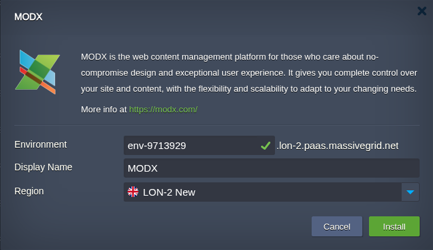
Open the installer
Click Install with free trial or Install to my account. The MassiveGRID PaaS dashboard opens with the MODX package pre-selected, so nothing has to be copied or pasted.
Sign up or sign in
New to the platform? Sign up for the free 14-day trial, which needs no credit card. Existing customers sign in with their usual dashboard credentials.
Choose region and deploy
Name the environment, pick New York, London, Frankfurt or Singapore, and confirm. The platform builds every MODX node, wires them together and hands you the live URL and credentials.
Who Runs MODX on PaaS
Design agencies
Studios building bespoke brand sites who want client-editable content without a theme's compromises.
Accessibility-led public sites
Organisations that must ship exact, standards-compliant markup for WCAG conformance.
Content-driven microsites
Campaign and product sites where design freedom matters more than plugin ecosystems.
Why Run MODX on MassiveGRID PaaS
Built for uptime. MODX runs on MassiveGRID's high-availability platform, where every environment is covered by a 100% uptime SLA. Nodes live on redundant hosts, storage is replicated, and failed containers are restarted or migrated automatically.
Pay for what you use. Billing is hourly and per cloudlet (128 MiB RAM plus 400 MHz CPU). Vertical auto-scaling adds and removes cloudlets as load changes, so a quiet MODX environment costs a few dollars a month and a busy one grows without a migration. Full details are on the PaaS page.
Your choice of jurisdiction. Deploy in New York, London, Frankfurt or Singapore and keep data inside the region your users or regulators require. MassiveGRID is ISO 27001 and ISO 9001 certified and GDPR compliant, and has run hosting infrastructure since 2003.
No lock-in. The package is a standard Jelastic Packaging Standard (JPS) manifest. You keep root-level access to the containers, can export the manifest, and can move the workload to any other Jelastic-compatible platform or to your own servers at any time.
Related on massivegrid.com: Platform as a Service.
MODX Questions
MODX Guides from the MassiveGRID Blog
MODX is covered in these comparison guides and roundups, alongside the packages it is usually deployed with. Browse the blog.
More from the Marketplace
Packages that are often deployed alongside MODX, or that solve the same problem a different way. Browse all 83 packages.


Deploy MODX Today
Start the free 14-day trial and have MODX running in minutes. No credit card required.