
Magnolia CMS Hosting on MassiveGRID PaaS
Magnolia CMS is an enterprise-grade Java content management system known for its clean authoring interface, headless delivery and separation of author and public instances. The MassiveGRID PaaS package deploys Magnolia Community Edition on a Java application server in one click, ready for content modelling and integration work.
Magnolia CMS on MassiveGRID PaaS installs in one click in New York, London, Frankfurt or Singapore, costs about $78.72 a month for the Starter configuration, a Java application server (3 GiB) and a JCR repository database (1 GiB), and starts with a 14-day free trial. See the sizing table.
Both buttons open the MassiveGRID PaaS dashboard with Magnolia CMS pre-selected. Sign up without a card, name the environment, pick a region, and the package installs in a few minutes.
Magnolia CMS Package Facts
| Attribute | Value |
|---|---|
| Package | Magnolia CMS |
| Type | Application (installs a complete environment) |
| Category | Websites & CMS |
| Software vendor / project | Magnolia International Ltd. |
| Licence | GPLv3 (Community Edition, open source) |
| Runtime / stack | Java application server (Tomcat), JCR content repository, relational database |
| Regions | New York, London, Frankfurt, Singapore |
| Billing | Pay-per-use, about $78.72/month for the Starter configuration (32 cloudlets at $0.003372 per cloudlet-hour), no licence fee |
| Free trial | 14 days, no credit card |
| Uptime SLA | 100% |
What is Magnolia CMS?
Magnolia sits at the digital-experience end of the CMS spectrum. Editors work in a visual page editor with reusable components, personalisation and campaign tools, while developers define content types in light YAML modules and deliver content through REST and GraphQL endpoints to websites, apps and kiosks. Its authoring and public instances are separate, so editors work privately and publish to a hardened delivery tier.
Because Magnolia is a Java application backed by a JCR content repository, it needs an application server with a properly sized heap. The marketplace package provisions Tomcat, the repository storage and a linked database on MassiveGRID PaaS, so teams can spin up author and public environments in minutes and scale each independently.
What the Magnolia CMS Package Deploys
Marketplace packages are not bare container images. One click provisions a complete, production-shaped environment on MassiveGRID infrastructure. How these nodes are sized and what they cost.
- Java application server: Tomcat running the Magnolia web application with JVM settings tied to the allocated cloudlets.
- JCR repository and database: Persistent repository storage plus a linked relational database for Magnolia's content store.
- Author and public webapps: The Community Edition bundle, installable as a combined instance or split into separate author and public environments.
- Built-in domain and SSL: HTTPS on a platform subdomain immediately, with your own domains attached via Let's Encrypt.
What Magnolia CMS Costs to Run
Three starting configurations for the Magnolia CMS package, sized in cloudlets (1 cloudlet = 128 MiB RAM + 400 MHz CPU) and priced at the published rate of $0.003372 per cloudlet-hour, or $2.46 per cloudlet-month.
| Configuration | Topology | Cloudlets | Est. per month |
|---|---|---|---|
| StarterEvaluation and small teams | Java application server (24 cloudlets, 3 GiB), JCR repository database (8 cloudlets, 1 GiB) | 32 | $78.72 |
| StandardA team in daily use | Java application server (32 cloudlets, 4 GiB), JCR repository database (16 cloudlets, 2 GiB) | 48 | $118.08 |
| ProductionHigh traffic, scaled horizontally | NGINX load balancer (4 cloudlets, 512 MiB), 2 × Java application server (32 cloudlets, 4 GiB each), JCR repository database (16 cloudlets, 2 GiB) | 84 | $206.64 |
Estimates assume the environment averages the listed cloudlets around the clock; billing is hourly, vertical auto-scaling lowers the figure when the application is idle, and volume discounts apply as usage grows. Disk and external traffic are billed per gigabyte on top. No licence fee applies to the package. Pick a row in the installer by setting the cloudlet limits per node, or start small and let auto-scaling grow it. Price a different topology or a working-hours schedule in the PaaS pricing calculator; the PaaS page describes the billing model.
Why Teams Choose Magnolia CMS
Author/public separation
Editors work on an author instance and publish to public instances, which can be scaled and secured independently.
Headless and hybrid delivery
REST and GraphQL APIs feed single-page apps and mobile apps while the page editor still renders classic sites.
Light development
Content types, templates and dialogs defined in YAML, with hot reloading, keep the Java code base small.
Personalisation and campaigns
Segment visitors and vary components per audience, with A/B testing available through modules.
How to Install Magnolia CMS on MassiveGRID PaaS
Installing the package takes three steps and a few minutes of waiting. No servers to provision, no configuration files to edit.
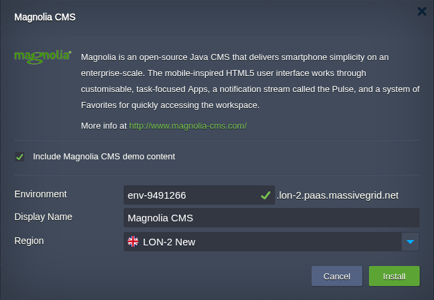
Open the installer
Click Install with free trial or Install to my account. The MassiveGRID PaaS dashboard opens with the Magnolia CMS package pre-selected, so nothing has to be copied or pasted.
Sign up or sign in
New to the platform? Sign up for the free 14-day trial, which needs no credit card. Existing customers sign in with their usual dashboard credentials.
Choose region and deploy
Name the environment, pick New York, London, Frankfurt or Singapore, and confirm. The platform builds every Magnolia CMS node, wires them together and hands you the live URL and credentials.
Who Runs Magnolia CMS on PaaS
Enterprise marketing sites
Brands with many markets and languages that need governed publishing and personalisation.
Headless content hubs
Organisations feeding one content repository to web, app and in-store channels.
Financial services and insurance
Regulated companies wanting an on-premise-style deployment in a chosen region with author/public isolation.
Why Run Magnolia CMS on MassiveGRID PaaS
Built for uptime. Magnolia CMS runs on MassiveGRID's high-availability platform, where every environment is covered by a 100% uptime SLA. Nodes live on redundant hosts, storage is replicated, and failed containers are restarted or migrated automatically.
Pay for what you use. Billing is hourly and per cloudlet (128 MiB RAM plus 400 MHz CPU). Vertical auto-scaling adds and removes cloudlets as load changes, so a quiet Magnolia CMS environment costs a few dollars a month and a busy one grows without a migration. Full details are on the PaaS page.
Your choice of jurisdiction. Deploy in New York, London, Frankfurt or Singapore and keep data inside the region your users or regulators require. MassiveGRID is ISO 27001 and ISO 9001 certified and GDPR compliant, and has run hosting infrastructure since 2003.
No lock-in. The package is a standard Jelastic Packaging Standard (JPS) manifest. You keep root-level access to the containers, can export the manifest, and can move the workload to any other Jelastic-compatible platform or to your own servers at any time.
Related on massivegrid.com: Platform as a Service · For Enterprises.
Magnolia CMS Questions
Magnolia CMS Guides from the MassiveGRID Blog
Magnolia CMS is covered in these comparison guides and roundups, alongside the packages it is usually deployed with. Browse the blog.
More from the Marketplace
Packages that are often deployed alongside Magnolia CMS, or that solve the same problem a different way. Browse all 83 packages.


Deploy Magnolia CMS Today
Start the free 14-day trial and have Magnolia CMS running in minutes. No credit card required.