
Flowise Hosting on MassiveGRID PaaS
Flowise is an open-source, low-code platform for building LLM applications visually: drag nodes for models, prompts, vector stores, tools and memory onto a canvas and connect them into chatbots, agents and retrieval-augmented generation (RAG) pipelines. The MassiveGRID PaaS package self-hosts Flowise in one click so your API keys, documents and conversations stay in your environment.
Flowise on MassiveGRID PaaS installs in one click in New York, London, Frankfurt or Singapore, costs about $19.68 a month for the Starter configuration, a Node.js application server (1 GiB), and starts with a 14-day free trial. See the sizing table.
Both buttons open the MassiveGRID PaaS dashboard with Flowise pre-selected. Sign up without a card, name the environment, pick a region, and the package installs in a few minutes.
Flowise Package Facts
| Attribute | Value |
|---|---|
| Package | Flowise AI |
| Type | Application (installs a complete environment) |
| Category | AI & Automation |
| Software vendor / project | FlowiseAI |
| Licence | Apache License 2.0 (open source) |
| Runtime / stack | Node.js application server running Flowise, persistent database and storage |
| Regions | New York, London, Frankfurt, Singapore |
| Billing | Pay-per-use, about $19.68/month for the Starter configuration (8 cloudlets at $0.003372 per cloudlet-hour), no licence fee |
| Free trial | 14 days, no credit card |
| Uptime SLA | 100% |
What is Flowise?
Flowise wraps LangChain and LlamaIndex components in a visual editor. You can connect OpenAI, Anthropic, Google, Mistral, Ollama and other model providers, load documents from files, websites and databases into vector stores, add tools such as web search or custom APIs, and publish the result as a chat widget, REST endpoint or embeddable component. Multi-agent flows let several specialised agents collaborate on a task.
Hosting Flowise yourself matters because the flows contain API keys, and the documents you index often contain confidential data. The package deploys Flowise on a Node.js server with persistent storage for its database, uploaded files and vector data, protected by application authentication and HTTPS. Vertical auto-scaling covers spikes when many users chat at once.
What the Flowise Package Deploys
Marketplace packages are not bare container images. One click provisions a complete, production-shaped environment on MassiveGRID infrastructure. How these nodes are sized and what they cost.
- Node.js application server: A Node.js container running the current Flowise release with the process managed for automatic restart.
- Persistent data: Flowise's database, uploaded documents, credentials and local vector stores on persistent storage with snapshots.
- Authentication and HTTPS: Application login credentials set at install and HTTPS on the platform subdomain.
- Room for companions: Add a PostgreSQL node with pgvector or a Redis node from the topology editor for production vector storage and caching.
What Flowise Costs to Run
Three starting configurations for the Flowise package, sized in cloudlets (1 cloudlet = 128 MiB RAM + 400 MHz CPU) and priced at the published rate of $0.003372 per cloudlet-hour, or $2.46 per cloudlet-month.
| Configuration | Topology | Cloudlets | Est. per month |
|---|---|---|---|
| StarterBuilding and testing flows | Node.js application server (8 cloudlets, 1 GiB) | 8 | $19.68 |
| StandardA team using chatflows daily | Node.js application server (16 cloudlets, 2 GiB) | 16 | $39.36 |
| ProductionMany concurrent conversations | Node.js application server (32 cloudlets, 4 GiB) | 32 | $78.72 |
Estimates assume the environment averages the listed cloudlets around the clock; billing is hourly, vertical auto-scaling lowers the figure when the application is idle, and volume discounts apply as usage grows. Disk and external traffic are billed per gigabyte on top. No licence fee applies to the package. Pick a row in the installer by setting the cloudlet limits per node, or start small and let auto-scaling grow it. Price a different topology or a working-hours schedule in the PaaS pricing calculator; the PaaS page describes the billing model.
Flowise on MassiveGRID PaaS vs Flowise Cloud vs a VPS
The same application three ways: the marketplace package here, the vendor's own hosted offer, and a server you run yourself. Flowise Cloud figures were read from the vendor's page on 1 November 2026; re-check them before relying on them.
| Aspect | Flowise on MassiveGRID PaaS | Flowise Cloud | A plain VPS |
|---|---|---|---|
| Monthly cost | About $19.68 (Starter) to $78.72 (Production), before discounts; Flowise has no licence fee | Not checked (page could not be read). Flowise Cloud publishes plans with prediction limits; its pricing host was not reachable from this session | A 1 to 4 GB server's monthly price; plus your time |
| What you manage | The application inside the containers (updates, configuration); the platform runs the infrastructure, scaling and the 100% uptime SLA | Nothing; Flowise runs it | Everything: OS, runtime, database, TLS, backups, upgrades |
| Limits and metering | No prediction metering; capacity is the node's cloudlets | Predictions and storage per plan | No metering; limited by the server's size |
| Scaling | Vertical by the cloudlet, automatic and without restart; horizontal on a trigger behind the platform's load balancer | Buy a higher plan | Resize the server, usually with a reboot; no horizontal scaling without your own load balancer |
| Data location | New York, London, Frankfurt or Singapore, chosen at install; data stays there | Flowise Cloud's hosting | Wherever the VPS is; one server, one location |
| Backups | Database Backup/Restore and Backup Storage add-ons on a schedule, environment clone for rehearsals | Flowise's responsibility; chatflows export as JSON | Your own cron jobs and off-server copies |
| Availability | 100% uptime SLA, nodes on separate hosts, failed containers restarted or migrated | Flowise Cloud's availability commitment | Single server; the provider's hardware SLA only |
| Lock-in | Standard JPS manifest and root access; export the manifest or move the containers at any time | Chatflows export; vector data needs separate migration | None; you own the server |
Where Flowise Cloud is the better choice: Flowise Cloud is the right answer for prototyping and for teams whose prediction volume sits inside a small plan and who would rather not run a server.
Why Teams Choose Flowise
Visual LLM app builder
Chains, agents, RAG and multi-agent flows assembled from more than 100 node types without writing code.
Any model provider
Commercial APIs or self-hosted models via Ollama and compatible endpoints, switchable per flow.
Publish anywhere
Expose flows as REST APIs, embeddable chat widgets or share links, with API keys for access control.
Private by default
Keys, documents and chat history stay in your MassiveGRID region, not on a third-party SaaS.
How to Install Flowise on MassiveGRID PaaS
Installing the package takes three steps and a few minutes of waiting. No servers to provision, no configuration files to edit.
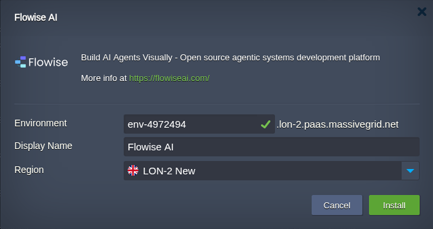
Open the installer
Click Install with free trial or Install to my account. The MassiveGRID PaaS dashboard opens with the Flowise package pre-selected, so nothing has to be copied or pasted.
Sign up or sign in
New to the platform? Sign up for the free 14-day trial, which needs no credit card. Existing customers sign in with their usual dashboard credentials.
Choose region and deploy
Name the environment, pick New York, London, Frankfurt or Singapore, and confirm. The platform builds every Flowise node, wires them together and hands you the live URL and credentials.
Who Runs Flowise on PaaS
Internal knowledge assistants
Chatbots answering questions over company documents with RAG, hosted privately.
Customer support bots
Website assistants grounded in product documentation and connected to ticketing tools.
Rapid AI prototyping
Product teams testing agent designs and prompts before committing engineering time.
Why Run Flowise on MassiveGRID PaaS
Predictions are not metered. Flowise Cloud is priced by plan; the package bills the cloudlets the Node.js node uses, so a chatbot that answers ten thousand questions a day costs what its CPU and memory cost.
Documents and vectors stay where you put them. Deploy in Frankfurt or London and the uploaded files, the vector store and the credentials to model providers stay there, which is the GDPR case in detail.
Production Flowise is queue mode with workers, which is a second node layer on a trigger rather than a plan upgrade; the production post builds it with Redis and PostgreSQL from the same marketplace.
Model calls go wherever you point them, to a provider or to a model on MassiveGRID's GPU servers, over the internal network when both are in the account.
Related on massivegrid.com: Flowise Hosting · AI Infrastructure · n8n Hosting.
Flowise Questions
Flowise Guides from the MassiveGRID Blog
Scenario-driven guides on running Flowise on MassiveGRID PaaS, written for the developers, operators and buyers who deploy it. Browse the blog.
More from the Marketplace
Packages that are often deployed alongside Flowise, or that solve the same problem a different way. Browse all 83 packages.


Deploy Flowise Today
Start the free 14-day trial and have Flowise running in minutes. No credit card required.